
Persistent Memory Banks: Databases 🗄️
Give your agents persistent storage so they remember sessions, state, and user preferences across reboots.
If an agent doesn't have a database, it has amnesia. Every time you restart the script or reload the page, the agent completely forgets who you are and what you were doing.
Adding a database gives your agent a permanent hard drive! 🗄️
With a database connected, your agents, teams, and workflows can store:
- Chat History: Keep conversation history intact for seamless multi-turn conversations.
- Session Persistence: Retrieve the exact state of an agent across server restarts.
- Long-Term Memory: Save user preferences and extracted facts in the
kern_memoriestable. - Full Data Ownership: You query your own SQL database—no third-party cloud analytics lock-in!
🚀 The 5-Minute SQLite Quickstart
For local development, SQLite is the fastest way to get up and running. It writes a single database file locally to your machine:
1from kern.agent import Agent2from kern.db.sqlite import SqliteDb3from kern.models.openai import OpenAIChat45# 1. Establish a local SQLite database 📁6db = SqliteDb(db_file="tmp/agent_storage.db")78# 2. Attach it to your agent and set history limits9agent = Agent(10 model=OpenAIChat(id="llama3.2:3b", base_url="http://localhost:11434/v1"),11 db=db,12 add_history_to_context=True,13 num_history_runs=3, # Inject the last 3 turns into the chat context 🧠14)1516# Run 1: Start a conversation thread17agent.print_response(18 "I am working on building a local-first web app.",19 session_id="project_session_1"20)2122# Run 2: The agent retrieves the context from the database automatically!23agent.print_response(24 "What python web framework fits this best?",25 session_id="project_session_1"26)🗺️ How it flows
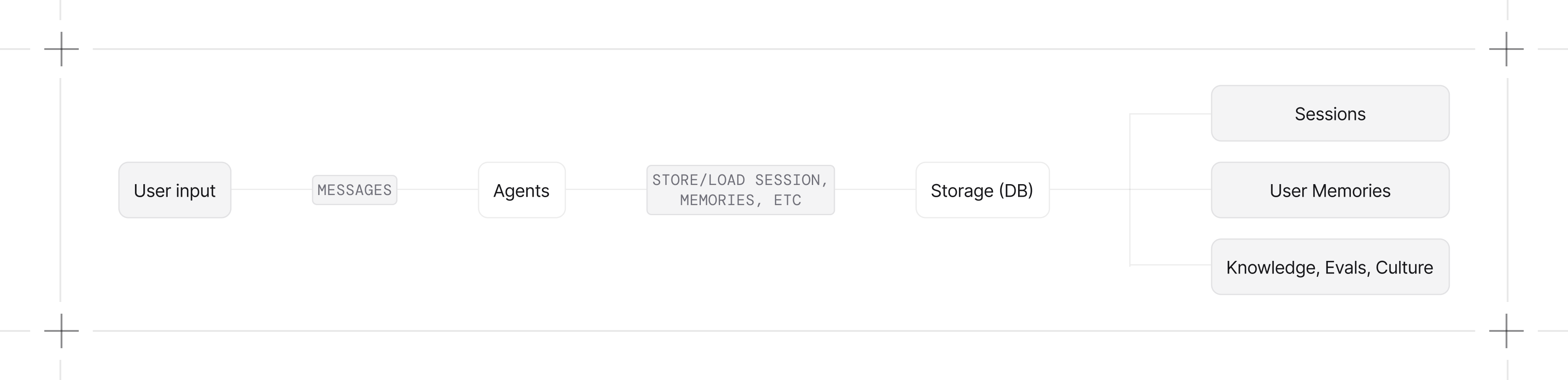
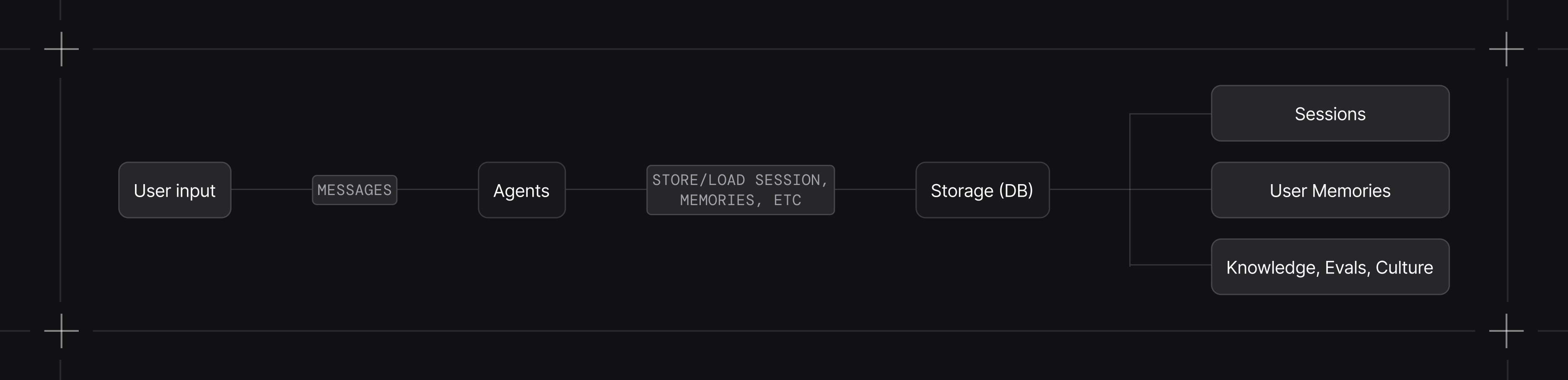
Here is how data moves between the model, agent, and your storage layout:
🤝 Works With Teams & Workflows
Storage configs are modular. You can pass the exact same database instance directly into Teams or Workflows:
1from kern.team import Team2from kern.workflow import Workflow3from kern.db.postgres import PostgresDb45db = PostgresDb(db_url="postgresql://user:pass@localhost:5432/my_app_db")67# Pass it right in! 🤝8team = Team(db=db, members=[...])9workflow = Workflow(db=db, steps=[...])⚡ Async Database Support
Building a high-throughput async API? Use the async database wrappers to avoid blocking the event loop:
1from kern.agent import Agent2from kern.db.postgres import AsyncPostgresDb34agent = Agent(5 db=AsyncPostgresDb(db_url="postgresql+psycopg_async://user:pass@localhost:5432/my_app_db"),6)💡 Troubleshooting SQL Connections
Got a 'MissingGreenlet' exception? 🐛▼
This happens if you accidentally use a synchronous database engine with an async database wrapper. Double check that you're using SQLAlchemy's async engines (e.g. create_async_engine).
Got an 'AsyncContextNotStarted' exception? 🐛▼
This is the opposite error: you are trying to use an async engine with a synchronous database class. Use a normal connection engine or swap the database wrapper to an async one.
📚 Storage Guides
Chat History 💬
Control how messages are appended to your context window.
Session Storage 💾
Store and fetch custom session variables.
Session Summaries 🗜️
Compress old messages to keep token usage low on small models.
Storage Control ⚙️
Choose exactly which variables get persisted to SQLite or PG.