
Workflow Session State
Coordinate state across workflow steps, agents, teams, and custom functions
Workflow session state enables sharing and updating state data across all components within a workflow: agents, teams, and custom functions.
Session state data will be persisted if a database is available, and loaded from there in subsequent runs of the workflow.
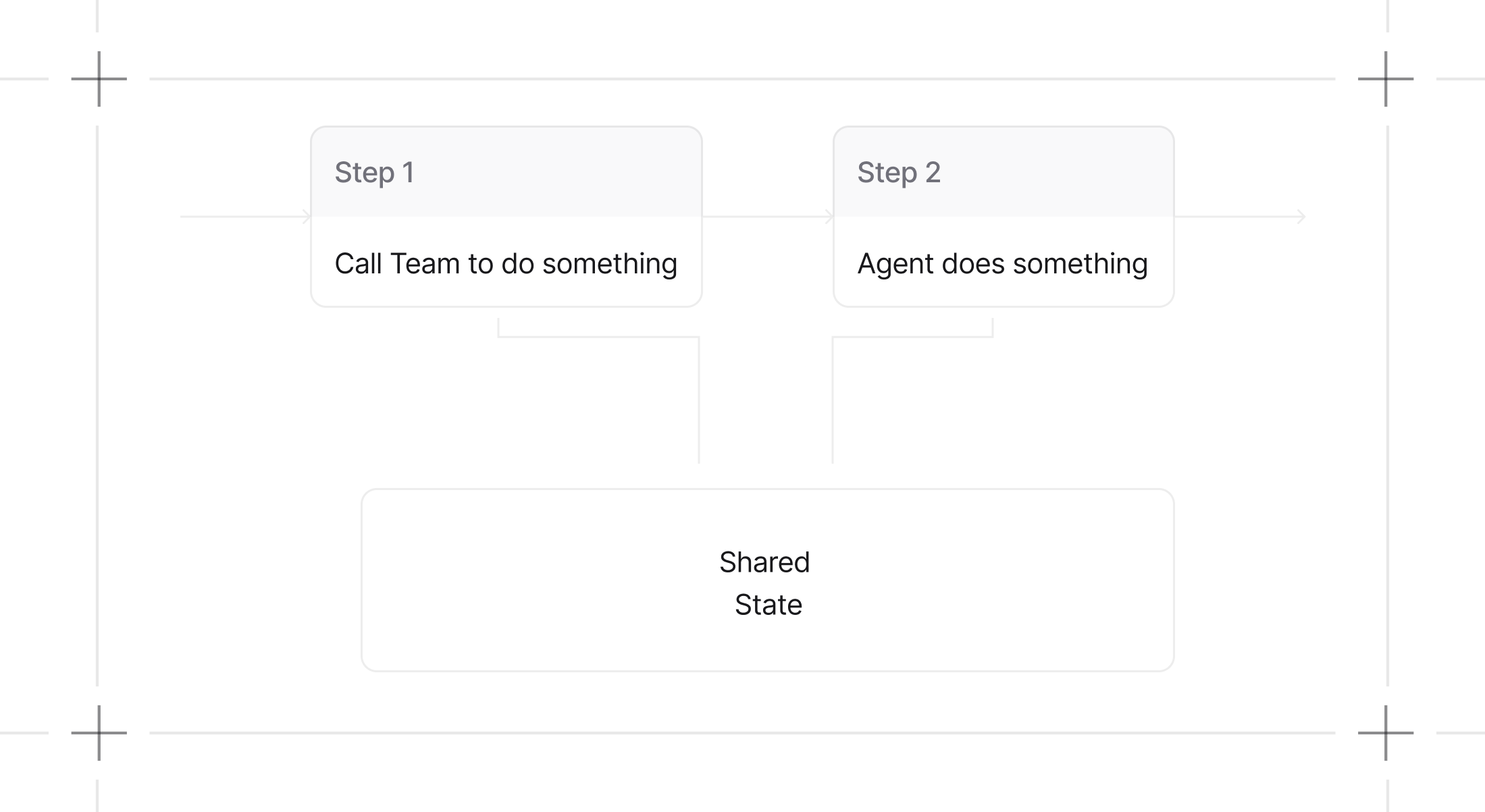
How Workflow Session State Works
1. State Initialization
Initialize session state when creating a workflow. The session state can start empty or with predefined data that all workflow components can access and modify.
1shopping_workflow = Workflow(2 name="Shopping List Workflow",3 steps=[manage_items_step, view_list_step],4 session_state={"shopping_list": []}, # Initialize with structured data5)2. Access and Modify State Data
All workflow components - agents, teams, and functions - can read from and write to the shared session state. This enables persistent data flow and coordination across the entire workflow execution.
From tools, you can access the session state via run_context.session_state.
Example: Shopping List Management
1from kern.agent import Agent2from kern.db.sqlite import SqliteDb3from kern.models.openai import OpenAIResponses4from kern.workflow.step import Step5from kern.workflow.workflow import Workflow6from kern.run import RunContext78db = SqliteDb(db_file="tmp/workflow.db")91011# Define tools to manage a shopping list in workflow session state12def add_item(run_context: RunContext, item: str) -> str:13 """Add an item to the shopping list in workflow session state.1415 Args:16 item (str): The item to add to the shopping list17 """18 if not run_context.session_state:19 run_context.session_state = {}2021 # Check if item already exists (case-insensitive)22 existing_items = [23 existing_item.lower() for existing_item in run_context.session_state["shopping_list"]24 ]25 if item.lower() not in existing_items:26 run_context.session_state["shopping_list"].append(item)27 return f"Added '{item}' to the shopping list."28 else:29 return f"'{item}' is already in the shopping list."303132def remove_item(run_context: RunContext, item: str) -> str:33 """Remove an item from the shopping list in workflow session state.3435 Args:36 item (str): The item to remove from the shopping list37 """38 if not run_context.session_state:39 run_context.session_state = {}4041 if len(run_context.session_state["shopping_list"]) == 0:42 return f"Shopping list is empty. Cannot remove '{item}'."4344 # Find and remove item (case-insensitive)45 shopping_list = run_context.session_state["shopping_list"]46 for i, existing_item in enumerate(shopping_list):47 if existing_item.lower() == item.lower():48 removed_item = shopping_list.pop(i)49 return f"Removed '{removed_item}' from the shopping list."5051 return f"'{item}' not found in the shopping list."525354def remove_all_items(run_context: RunContext) -> str:55 """Remove all items from the shopping list in workflow session state."""56 if not run_context.session_state:57 run_context.session_state = {}5859 run_context.session_state["shopping_list"] = []60 return "Removed all items from the shopping list."616263def list_items(run_context: RunContext) -> str:64 """List all items in the shopping list from workflow session state."""65 if not run_context.session_state:66 run_context.session_state = {}6768 if len(run_context.session_state["shopping_list"]) == 0:69 return "Shopping list is empty."7071 items = run_context.session_state["shopping_list"]72 items_str = "\n".join([f"- {item}" for item in items])73 return f"Shopping list:\n{items_str}"747576# Create agents with tools that use workflow session state77shopping_assistant = Agent(78 name="Shopping Assistant",79 model=OpenAIResponses(id="gpt-5.2"),80 tools=[add_item, remove_item, list_items],81 instructions=[82 "You are a helpful shopping assistant.",83 "You can help users manage their shopping list by adding, removing, and listing items.",84 "Always use the provided tools to interact with the shopping list.",85 "Be friendly and helpful in your responses.",86 ],87)8889list_manager = Agent(90 name="List Manager",91 model=OpenAIResponses(id="gpt-5.2"),92 tools=[list_items, remove_all_items],93 instructions=[94 "You are a list management specialist.",95 "You can view the current shopping list and clear it when needed.",96 "Always show the current list when asked.",97 "Confirm actions clearly to the user.",98 ],99)100101# Create steps102manage_items_step = Step(103 name="manage_items",104 description="Help manage shopping list items (add/remove)",105 agent=shopping_assistant,106)107108view_list_step = Step(109 name="view_list",110 description="View and manage the complete shopping list",111 agent=list_manager,112)113114# Create workflow with workflow_session_state115shopping_workflow = Workflow(116 name="Shopping List Workflow",117 db=db,118 steps=[manage_items_step, view_list_step],119 session_state={"shopping_list": []},120)121122if __name__ == "__main__":123 # Example 1: Add items to the shopping list124 print("=== Example 1: Adding Items ===")125 shopping_workflow.print_response(126 input="Please add milk, bread, and eggs to my shopping list."127 )128 print("Workflow session state:", shopping_workflow.get_session_state())129130 # Example 2: Add more items and view list131 print("\n=== Example 2: Adding More Items ===")132 shopping_workflow.print_response(133 input="Add apples and bananas to the list, then show me the complete list."134 )135 print("Workflow session state:", shopping_workflow.get_session_state())136137 # Example 3: Remove items138 print("\n=== Example 3: Removing Items ===")139 shopping_workflow.print_response(140 input="Remove bread from the list and show me what's left."141 )142 print("Workflow session state:", shopping_workflow.get_session_state())143144 # Example 4: Clear the entire list145 print("\n=== Example 4: Clearing List ===")146 shopping_workflow.print_response(147 input="Clear the entire shopping list and confirm it's empty."148 )149 print("Final workflow session state:", shopping_workflow.get_session_state())See the RunContext schema for more information.
3. run_context as a parameter for custom python functions step in workflow
You can add the run_context parameter to the Python functions you use as custom steps.
The run_context object will be automatically injected when running the function.
You can use it to read and modify the session state, via run_context.session_state.
On the function of the custom python function step for a workflow
1from kern.run import RunContext23def custom_function_step(step_input: StepInput, run_context: RunContext):4 """Update the workflow session state"""5 run_context.session_state["test"] = test_1See examples for more details.
The run_context is also available as a parameter in the evaluator and selector functions of the Condition and Router steps:
1from kern.run import RunContext23def evaluator_function(step_input: StepInput, run_context: RunContext):4 return run_context.session_state["test"] == "test_1"56condition_step = Condition(7 name="condition_step",8 evaluator=evaluator_function,9 steps=[step_1, step_2],10)1from kern.run import RunContext23def selector_function(step_input: StepInput, run_context: RunContext):4 return run_context.session_state["test"] == "test_1"56router_step = Router(7 name="router_step",8 selector=selector_function,9 choices=[step_1, step_2],10)See example of Session State in Condition Evaluator Function and Session State in Router Selector Function for more details.
Key Benefits
Persistent State Management
- Data persists across all workflow steps and components
- Enables complex, stateful workflows with memory
- Supports deterministic execution with consistent state
Cross-Component Coordination
- Agents, teams, and functions share the same state object
- Enables sophisticated collaboration patterns
- Maintains data consistency across workflow execution
Flexible Data Structure
- Use any Python data structure (dictionaries, lists, objects)
- Structure data to match your workflow requirements
- Access and modify state through standard Python operations
The run_context object, containing the session state, is automatically passed to all agents and teams within a
workflow, enabling seamless collaboration and data sharing between different
components without manual state management.