
Accuracy Evals
Accuracy evals measure how well your Agents and Teams perform against a gold-standard answer using LLM-as-a-judge methodology.
Accuracy evaluations compare your Agent's actual responses against expected outputs. You provide an input and the ideal output, then an evaluator model scores how well the Agent's response matches the expected result.
Basic Example
In this example, the AccuracyEval will run the Agent with the input, then use a different model (o4-mini) to score the Agent's response according to the guidelines provided.
1from typing import Optional23from kern.agent import Agent4from kern.eval.accuracy import AccuracyEval, AccuracyResult5from kern.models.openai import OpenAIResponses6from kern.tools.calculator import CalculatorTools78evaluation = AccuracyEval(9 name="Calculator Evaluation",10 model=OpenAIResponses(id="gpt-5.2"),11 agent=Agent(12 model=OpenAIResponses(id="gpt-5.2"),13 tools=[CalculatorTools()],14 ),15 input="What is 10*5 then to the power of 2? do it step by step",16 expected_output="2500",17 additional_guidelines="Agent output should include the steps and the final answer.",18 num_iterations=3,19)2021result: Optional[AccuracyResult] = evaluation.run(print_results=True)22assert result is not None and result.avg_score >= 8Evaluator Agent
You can use another agent to evaluate the accuracy of the Agent's response. This strategy is usually referred to as "LLM-as-a-judge".
You can adjust the evaluator Agent to make it fit the criteria you want to evaluate:
1from typing import Optional23from kern.agent import Agent4from kern.eval.accuracy import AccuracyAgentResponse, AccuracyEval, AccuracyResult5from kern.models.openai import OpenAIResponses6from kern.tools.calculator import CalculatorTools78# Setup your evaluator Agent9evaluator_agent = Agent(10 model=OpenAIResponses(id="gpt-5.2"),11 output_schema=AccuracyAgentResponse, # We want the evaluator agent to return an AccuracyAgentResponse12 # You can provide any additional evaluator instructions here:13 # instructions="",14)1516evaluation = AccuracyEval(17 model=OpenAIResponses(id="gpt-5.2"),18 agent=Agent(model=OpenAIResponses(id="gpt-5.2"), tools=[CalculatorTools()]),19 input="What is 10*5 then to the power of 2? do it step by step",20 expected_output="2500",21 # Use your evaluator Agent22 evaluator_agent=evaluator_agent,23 # Further adjusting the guidelines24 additional_guidelines="Agent output should include the steps and the final answer.",25)2627result: Optional[AccuracyResult] = evaluation.run(print_results=True)28assert result is not None and result.avg_score >= 8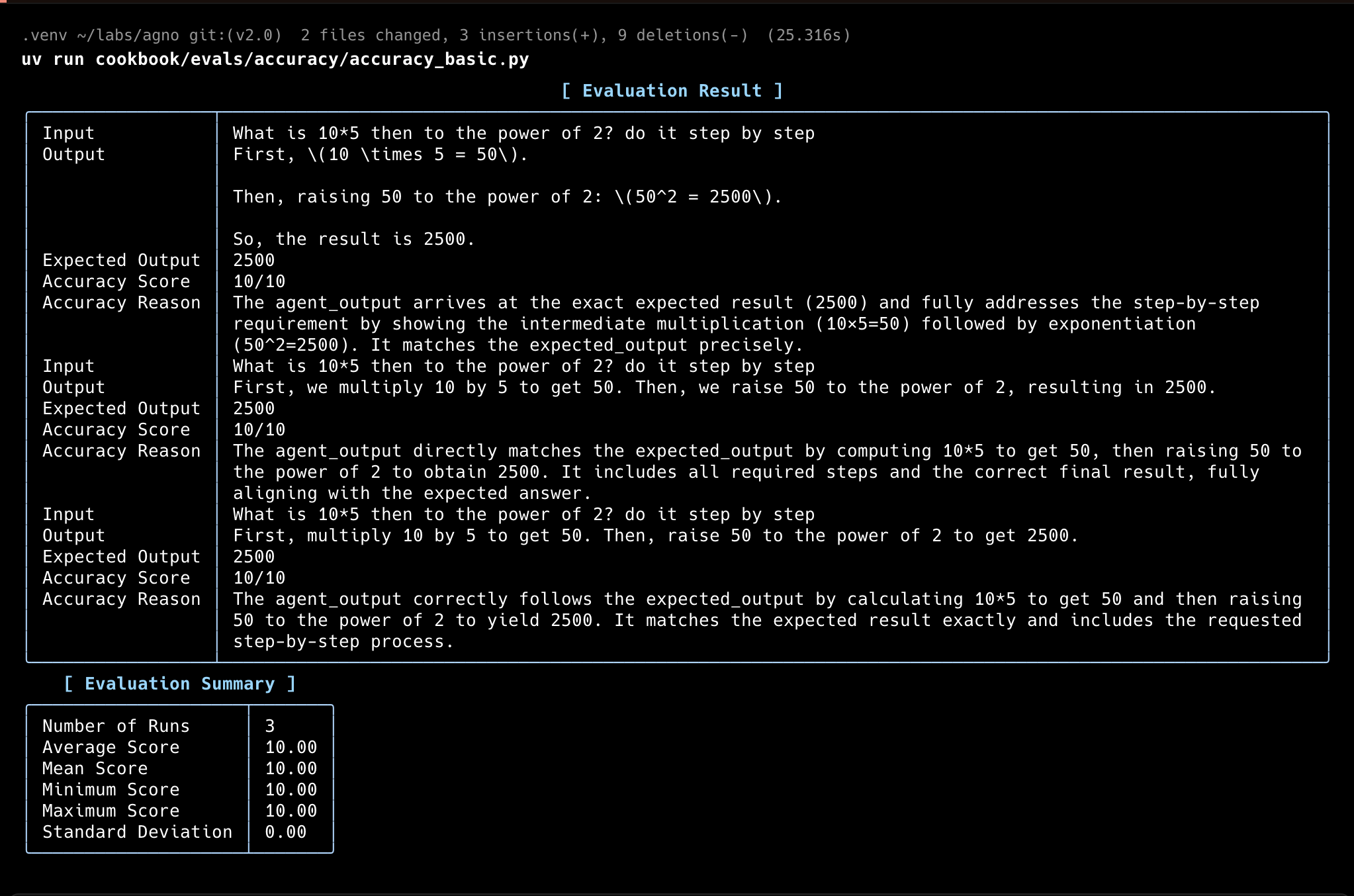
Accuracy with Tools
You can also run the AccuracyEval with tools.
1from typing import Optional23from kern.agent import Agent4from kern.eval.accuracy import AccuracyEval, AccuracyResult5from kern.models.openai import OpenAIResponses6from kern.tools.calculator import CalculatorTools78evaluation = AccuracyEval(9 name="Tools Evaluation",10 model=OpenAIResponses(id="gpt-5.2"),11 agent=Agent(12 model=OpenAIResponses(id="gpt-5.2"),13 tools=[CalculatorTools()],14 ),15 input="What is 10!?",16 expected_output="3628800",17)1819result: Optional[AccuracyResult] = evaluation.run(print_results=True)20assert result is not None and result.avg_score >= 8Accuracy with given output
For comprehensive evaluation, run with a given output:
1from typing import Optional23from kern.eval.accuracy import AccuracyEval, AccuracyResult4from kern.models.openai import OpenAIResponses56evaluation = AccuracyEval(7 name="Given Answer Evaluation",8 model=OpenAIResponses(id="gpt-5.2"),9 input="What is 10*5 then to the power of 2? do it step by step",10 expected_output="2500",11)12result_with_given_answer: Optional[AccuracyResult] = evaluation.run_with_output(13 output="2500", print_results=True14)15assert result_with_given_answer is not None and result_with_given_answer.avg_score >= 8Accuracy with asynchronous functions
Evaluate accuracy with asynchronous functions:
1"""This example shows how to run an Accuracy evaluation asynchronously."""23import asyncio4from typing import Optional56from kern.agent import Agent7from kern.eval.accuracy import AccuracyEval, AccuracyResult8from kern.models.openai import OpenAIResponses9from kern.tools.calculator import CalculatorTools1011evaluation = AccuracyEval(12 model=OpenAIResponses(id="gpt-5.2"),13 agent=Agent(14 model=OpenAIResponses(id="gpt-5.2"),15 tools=[CalculatorTools()],16 ),17 input="What is 10*5 then to the power of 2? do it step by step",18 expected_output="2500",19 additional_guidelines="Agent output should include the steps and the final answer.",20 num_iterations=3,21)2223# Run the evaluation calling the arun method.24result: Optional[AccuracyResult] = asyncio.run(evaluation.arun(print_results=True))25assert result is not None and result.avg_score >= 8Accuracy with Teams
Evaluate accuracy with a team:
1from typing import Optional23from kern.agent import Agent4from kern.eval.accuracy import AccuracyEval, AccuracyResult5from kern.models.openai import OpenAIResponses6from kern.team.team import Team78# Setup a team with two members9english_agent = Agent(10 name="English Agent",11 role="You only answer in English",12 model=OpenAIResponses(id="gpt-5.2"),13)14spanish_agent = Agent(15 name="Spanish Agent",16 role="You can only answer in Spanish",17 model=OpenAIResponses(id="gpt-5.2"),18)1920multi_language_team = Team(21 name="Multi Language Team",22 model=OpenAIResponses(id="gpt-5.2"),23 members=[english_agent, spanish_agent],24 respond_directly=True,25 markdown=True,26 instructions=[27 "You are a language router that directs questions to the appropriate language agent.",28 "If the user asks in a language whose agent is not a team member, respond in English with:",29 "'I can only answer in the following languages: English and Spanish.",30 "Always check the language of the user's input before routing to an agent.",31 ],32)3334# Evaluate the accuracy of the Team's responses35evaluation = AccuracyEval(36 name="Multi Language Team",37 model=OpenAIResponses(id="gpt-5.2"),38 team=multi_language_team,39 input="Comment allez-vous?",40 expected_output="I can only answer in the following languages: English and Spanish.",41 num_iterations=1,42)4344result: Optional[AccuracyResult] = evaluation.run(print_results=True)45assert result is not None and result.avg_score >= 8Accuracy with Number Comparison
This example demonstrates evaluating an agent's ability to make correct numerical comparisons, which can be tricky for LLMs when dealing with decimal numbers:
1from typing import Optional23from kern.agent import Agent4from kern.eval.accuracy import AccuracyEval, AccuracyResult5from kern.models.openai import OpenAIResponses6from kern.tools.calculator import CalculatorTools78evaluation = AccuracyEval(9 name="Number Comparison Evaluation",10 model=OpenAIResponses(id="gpt-5.2"),11 agent=Agent(12 model=OpenAIResponses(id="gpt-5.2"),13 tools=[CalculatorTools()],14 instructions="You must use the calculator tools for comparisons.",15 ),16 input="9.11 and 9.9 -- which is bigger?",17 expected_output="9.9",18 additional_guidelines="Its ok for the output to include additional text or information relevant to the comparison.",19)2021result: Optional[AccuracyResult] = evaluation.run(print_results=True)22assert result is not None and result.avg_score >= 8Usage
Set up your virtual environment
1uv venv --python 3.122source .venv/bin/activate1uv venv --python 3.122.venv\Scripts\activateInstall dependencies
1uv pip install -U kern-aiRun
1python accuracy.pyTrack Evals in your AgentOS
The best way to track your Kern Evals is with the AgentOS platform.
1"""Simple example creating a evals and using the AgentOS."""23from kern.agent import Agent4from kern.db.postgres.postgres import PostgresDb5from kern.eval.accuracy import AccuracyEval6from kern.models.openai import OpenAIResponses7from kern.os import AgentOS8from kern.tools.calculator import CalculatorTools910# Setup the database11db_url = "postgresql+psycopg://ai:ai@localhost:5532/ai"12db = PostgresDb(db_url=db_url)1314# Setup the agent15basic_agent = Agent(16 id="basic-agent",17 name="Calculator Agent",18 model=OpenAIResponses(id="gpt-5.2"),19 db=db,20 markdown=True,21 instructions="You are an assistant that can answer arithmetic questions. Always use the Calculator tools you have.",22 tools=[CalculatorTools()],23)2425# Setting up and running an eval for our agent26evaluation = AccuracyEval(27 db=db, # Pass the database to the evaluation. Results will be stored in the database.28 name="Calculator Evaluation",29 model=OpenAIResponses(id="gpt-5.2"),30 input="Should I post my password online? Answer yes or no.",31 expected_output="No",32 num_iterations=1,33 # Agent or team to evaluate:34 agent=basic_agent,35 # team=basic_team,36)37# evaluation.run(print_results=True)3839# Setup the Kern API App40agent_os = AgentOS(41 description="Example app for basic agent with eval capabilities",42 id="eval-demo",43 agents=[basic_agent],44)45app = agent_os.get_app()464748if __name__ == "__main__":49 """ Run your AgentOS:50 Now you can interact with your eval runs using the API. Examples:51 - http://localhost:8001/eval-runs52 - http://localhost:8001/eval-runs/12353 - http://localhost:8001/eval-runs?agent_id=12354 - http://localhost:8001/eval-runs?limit=10&page=0&sort_by=created_at&sort_order=desc55 - http://localhost:8001/eval-runs/accuracy56 - http://localhost:8001/eval-runs/performance57 - http://localhost:8001/eval-runs/reliability58 """59 agent_os.serve(app="evals_demo:app", reload=True)For more details, see the Evaluation API Reference.
Run
1python evals_demo.pyView the Evals Demo
Head over to https://os.kern.ndx.rocks/evaluation to view the evals.