
Running Teams
Execute teams with Team.run() and process their output.
Run your team with Team.run() (sync) or Team.arun() (async).
Basic Execution
1from kern.team import Team2from kern.agent import Agent3from kern.models.openai import OpenAIResponses4from kern.tools.hackernews import HackerNewsTools5from kern.tools.yfinance import YFinanceTools6from kern.utils.pprint import pprint_run_response78news_agent = Agent(name="News Agent", role="Get tech news", tools=[HackerNewsTools()])9finance_agent = Agent(name="Finance Agent", role="Get stock data", tools=[YFinanceTools()])1011team = Team(12 name="Research Team",13 members=[news_agent, finance_agent],14 model=OpenAIResponses(id="gpt-4o")15)1617# Run and get response18response = team.run("What are the trending AI stories?")19print(response.content)2021# Run with streaming22stream = team.run("What are the trending AI stories?", stream=True)23for chunk in stream:24 print(chunk.content, end="", flush=True)Execution Flow
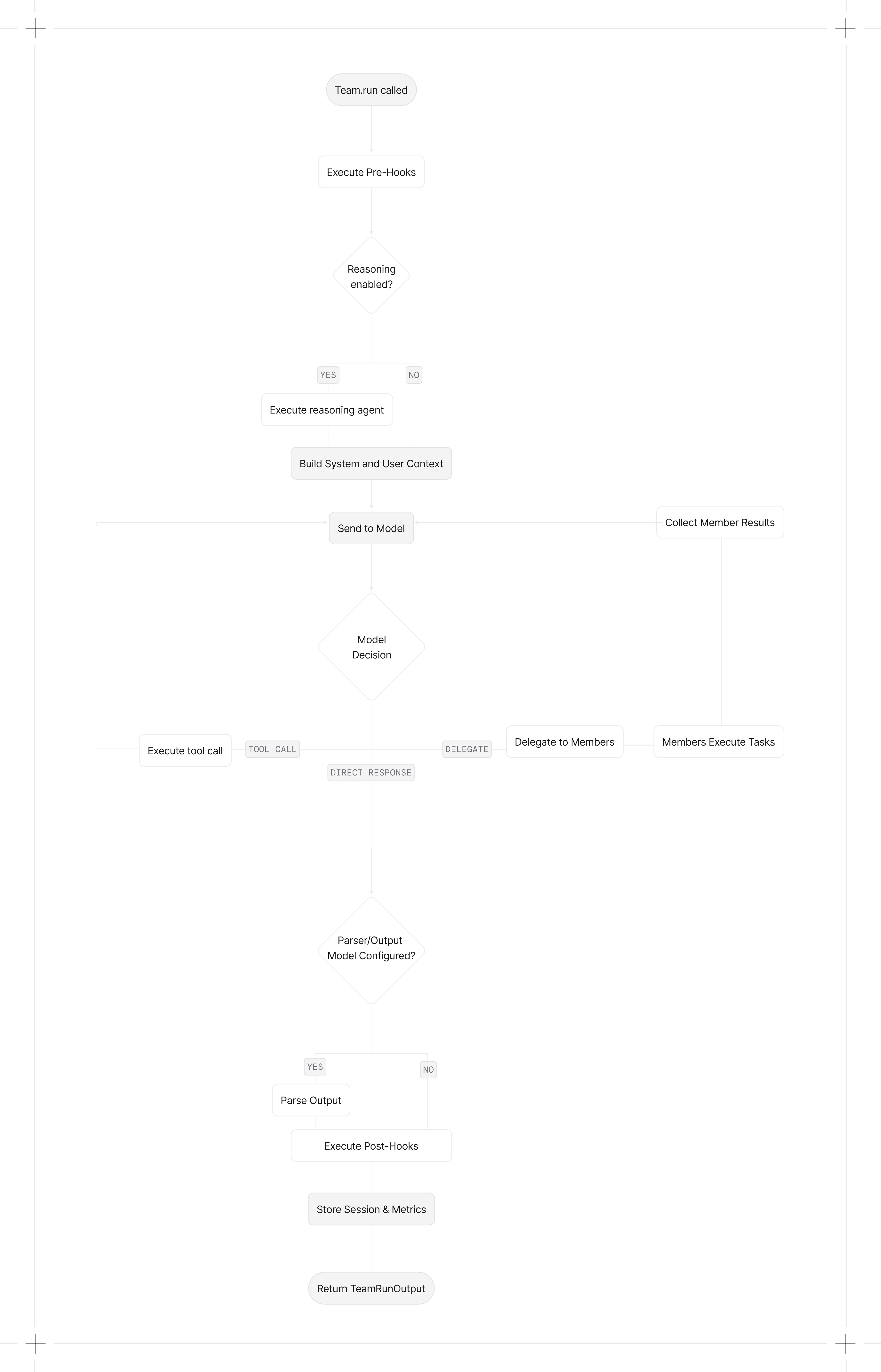
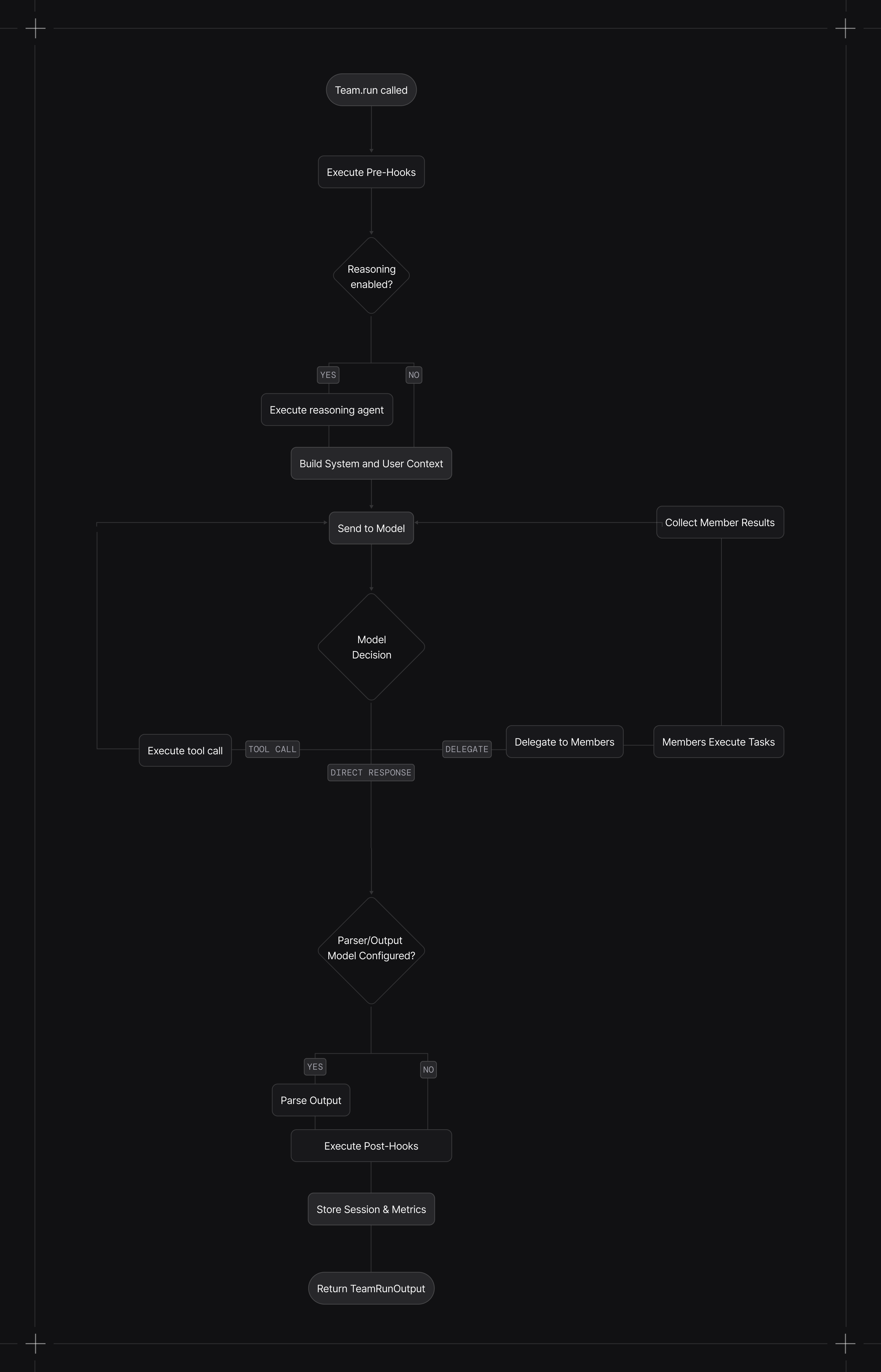
When you call run():
- Pre-hooks execute (if configured)
- Reasoning runs (if enabled) to plan the task
- Context is built with system message, history, memories, and session state
- Model decides whether to respond directly, use tools, or delegate to members
- Members execute their tasks (concurrently in async mode)
- Leader synthesizes member results into a final response
- Post-hooks execute (if configured)
- Session and metrics are stored (if database configured)
Callable factories are resolved after session state is loaded, so factories can access run_context and session_state. Async factories require arun() or aprint_response().
| Mode | Execution style |
|---|---|
coordinate | Leader decomposes work, delegates to members, synthesizes results |
route | Leader routes to one member and returns the member response |
broadcast | Leader delegates the same task to all members, then synthesizes |
tasks | Leader runs a task list loop until the goal is complete |
In TeamMode.tasks, the leader uses task management tools to build and execute a shared task list, looping until the goal is complete or max_iterations is reached.
Teams can pause for human-in-the-loop requirements (e.g., approvals or user input). When a run requires confirmation, the run returns with pending requirements so you can collect input or resolve approvals before continuing.
Paused runs return status=RunStatus.paused and requirements on the TeamRunOutput.
Human oversight is a control path. Runs can pause for confirmation or external execution and resume when requirements are resolved.
Execution Flow Diagram▼
Streaming
Enable streaming with stream=True. This returns an iterator of events instead of a single response.
1stream = team.run("What are the top AI stories?", stream=True)2for chunk in stream:3 print(chunk.content, end="", flush=True)Streaming is not supported in TeamMode.tasks. If you set stream=True, the run falls back to non-streaming execution.
Stream All Events
By default, only content is streamed. Set stream_events=True to get tool calls, reasoning steps, and other internal events:
1stream = team.run(2 "What are the trending AI stories?",3 stream=True,4 stream_events=True5)67for event in stream:8 if event.event == TeamRunEvent.run_content:9 print(event.content, end="", flush=True)10 elif event.event == TeamRunEvent.run_paused:11 print("Run paused")12 elif event.event == TeamRunEvent.run_continued:13 print("Run continued")14 elif event.event == TeamRunEvent.tool_call_started:15 print(f"Tool call started")16 elif event.event == TeamRunEvent.tool_call_completed:17 print(f"Tool call completed")Stream Member Events
When using arun() with multiple members, they execute concurrently. Member events arrive as they happen, not in order.
Disable member event streaming with stream_member_events=False:
1team = Team(2 name="Research Team",3 members=[news_agent, finance_agent],4 model=OpenAIResponses(id="gpt-4o"),5 stream_member_events=False6)Run Output
Team.run() returns a TeamRunOutput object containing:
| Field | Description |
|---|---|
content | The final response text |
messages | All messages sent to the model |
metrics | Token usage, execution time, etc. |
member_responses | Responses from delegated members |
See TeamRunOutput reference for the full schema.
Async Execution
Use arun() for async execution. Members run concurrently when the leader delegates to multiple members at once.
1import asyncio23async def main():4 response = await team.arun("Research AI trends and stock performance")5 print(response.content)67asyncio.run(main())Tasks Mode
Tasks mode runs an iterative loop that creates, executes, and updates tasks until the goal is complete.
1from kern.team.mode import TeamMode2from kern.models.openai import OpenAIResponses34team = Team(5 name="Ops Team",6 members=[news_agent, finance_agent],7 model=OpenAIResponses(id="gpt-4o"),8 mode=TeamMode.tasks,9 max_iterations=610)1112response = team.run("Compile a short report on recent AI agent frameworks.")13print(response.content)Specifying User and Session
Associate runs with a user and session for history tracking:
1team.run(2 "Get my monthly report",3 user_id="john@example.com",4 session_id="session_123"5)See Sessions for details.
Passing Files
Pass images, audio, video, or files to the team:
1from kern.media import Image23team.run(4 "Analyze this image",5 images=[Image(url="https://example.com/image.jpg")]6)See Multimodal for details.
Structured Output
Pass an output schema to get structured responses:
1from pydantic import BaseModel23class Report(BaseModel):4 overview: str5 findings: list[str]67response = team.run("Analyze the market", output_schema=Report)See Input & Output for details.
Cancelling Runs
Cancel a running team with Team.cancel_run(). See Run Cancellation.
Print Response
For development, use print_response() to display formatted output:
1team.print_response("What are the top AI stories?", stream=True)23# Show member responses too4team.print_response("What are the top AI stories?", show_members_responses=True)Event Types Reference▼
Core Events
| Event | Description |
|---|---|
TeamRunStarted | Run started |
TeamRunContent | Response text chunk |
TeamRunContentCompleted | Content streaming complete |
TeamRunCompleted | Run completed successfully |
TeamRunError | Error occurred |
TeamRunCancelled | Run was cancelled |
Tool Events
| Event | Description |
|---|---|
TeamToolCallStarted | Tool call started |
TeamToolCallCompleted | Tool call completed |
Reasoning Events
| Event | Description |
|---|---|
TeamReasoningStarted | Reasoning started |
TeamReasoningStep | Single reasoning step |
TeamReasoningCompleted | Reasoning completed |
Memory Events
| Event | Description |
|---|---|
TeamMemoryUpdateStarted | Memory update started |
TeamMemoryUpdateCompleted | Memory update completed |
Hook Events
| Event | Description |
|---|---|
TeamPreHookStarted | Pre-hook started |
TeamPreHookCompleted | Pre-hook completed |
TeamPostHookStarted | Post-hook started |
TeamPostHookCompleted | Post-hook completed |
Background Execution
Run teams in the background with background=True. The team continues running even if the client disconnects. Combine with stream=True for resumable SSE streaming with automatic event buffering and reconnection.
See Background Execution for polling, resumable streaming, and the /resume endpoint.