
LangDB
Integrate Kern with LangDB to trace agent execution, tool calls, and gain comprehensive observability into your agent's performance.
Integrating Kern with LangDB
LangDB provides an AI Gateway platform for comprehensive observability and tracing of AI agents and LLM interactions. By integrating Kern with LangDB, you can gain full visibility into your agent's operations, including agent runs, tool calls, team interactions, and performance metrics.
For detailed integration instructions, see the LangDB Kern documentation.
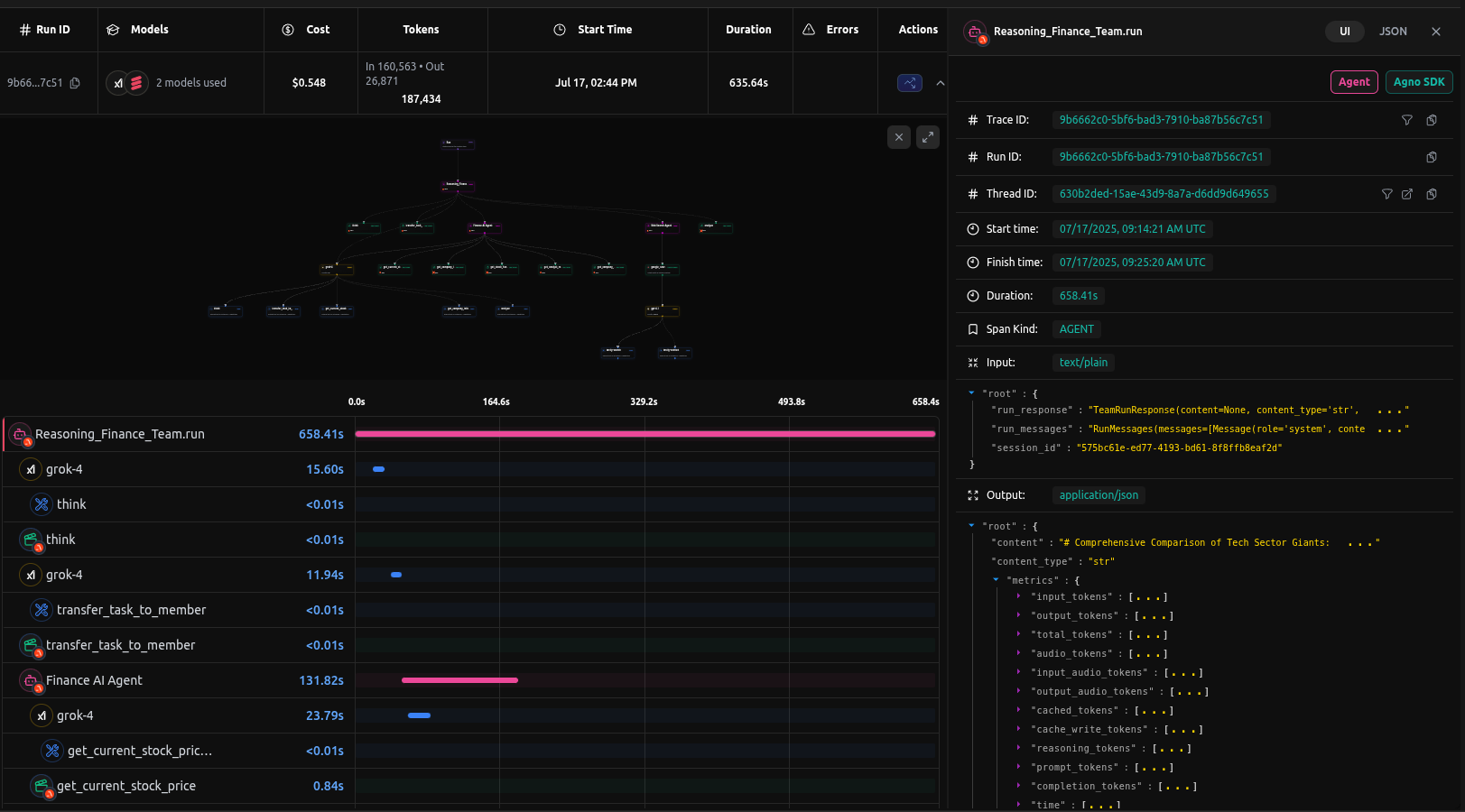
Prerequisites
-
Install Dependencies
Ensure you have the necessary packages installed:
1uv pip install kern-ai 'pylangdb[kern-ai]' -
Setup LangDB Account
- Sign up for an account at LangDB
- Create a new project in the LangDB dashboard
- Obtain your API key and Project ID from the project settings
-
Set Environment Variables
Configure your environment with the LangDB credentials:
1export LANGDB_API_KEY="<your_langdb_api_key>"2export LANGDB_PROJECT_ID="<your_langdb_project_id>"
Sending Traces to LangDB
Example: Basic Agent Setup
This example demonstrates how to instrument your Kern agent with LangDB tracing.
1from pylangdb.kern import init23# Initialize LangDB tracing - must be called before creating agents4init()56from kern.agent import Agent7from kern.models.langdb import LangDB8from kern.tools.hackernews import HackerNewsTools910# Create agent with LangDB model (uses environment variables automatically)11agent = Agent(12 name="Web Research Agent",13 model=LangDB(id="openai/gpt-4.1"),14 tools=[HackerNewsTools()],15 instructions="Answer questions using web search and provide comprehensive information"16)1718# Use the agent19response = agent.run("What are the latest developments in AI agents?")20print(response)Example: Multi-Agent Team Coordination
For more complex workflows, you can use Kern's Team class with LangDB tracing:
1from pylangdb.kern import init2init()34from kern.agent import Agent5from kern.team import Team6from kern.models.langdb import LangDB7from kern.tools.hackernews import HackerNewsTools8from kern.tools.yfinance import YFinanceTools910# Research Agent11web_agent = Agent(12 name="Market Research Agent",13 model=LangDB(id="openai/gpt-4.1"),14 tools=[HackerNewsTools()],15 instructions="Research current market conditions and news"16)1718# Financial Analysis Agent19finance_agent = Agent(20 name="Financial Analyst",21 model=LangDB(id="xai/grok-4"),22 tools=[YFinanceTools(stock_price=True, company_info=True)],23 instructions="Perform quantitative financial analysis"24)2526# Coordinated Team27reasoning_team = Team(28 name="Finance Reasoning Team",29 model=LangDB(id="xai/grok-4"),30 members=[web_agent, finance_agent],31 instructions=[32 "Collaborate to provide comprehensive financial insights",33 "Consider both fundamental analysis and market sentiment"34 ]35)3637# Execute team workflow38reasoning_team.print_response("Analyze Apple (AAPL) investment potential")Sample Trace
View a complete example trace in the LangDB dashboard: Finance Reasoning Team Trace
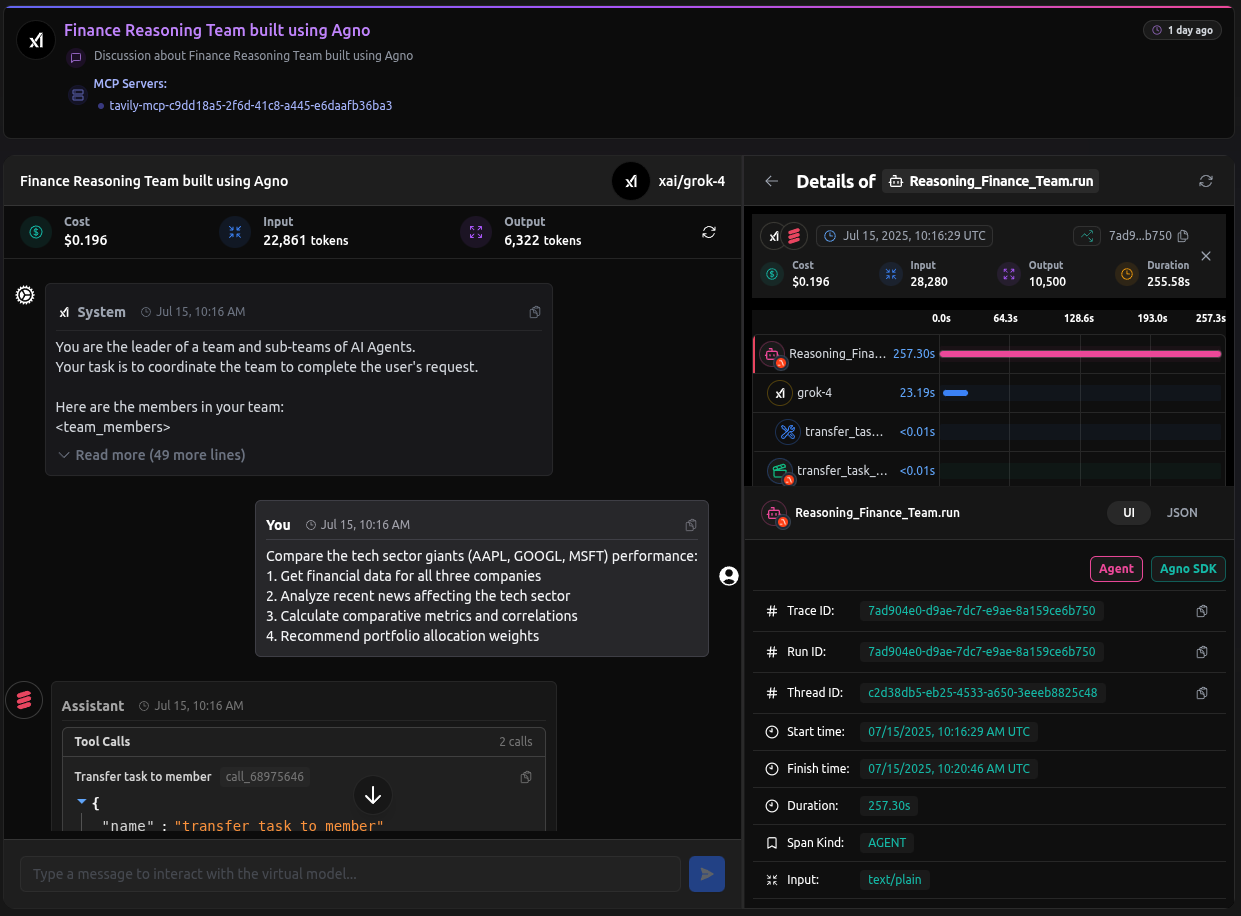
Advanced Features
LangDB Capabilities
- Virtual Models: Save, share, and reuse model configurations—combining prompts, parameters, tools, and routing logic into a single named unit for consistent behavior across apps
- MCP Support: Enhanced tool capabilities through Model Context Protocol servers
- Multi-Provider: Support for OpenAI, Anthropic, Google, xAI, and other providers
Notes
- Initialization Order: Always call
init()before creating any Kern agents or teams - Environment Variables: With
LANGDB_API_KEYandLANGDB_PROJECT_IDset, you can create models with justLangDB(id="model_name")
Resources
By following these steps, you can effectively integrate Kern with LangDB, enabling comprehensive observability and monitoring of your AI agents.