
Maxim
Connect Kern with Maxim to monitor, trace, and evaluate your agent's activity and performance.
Integrating Kern with Maxim
Maxim AI provides comprehensive agent monitoring, evaluation, and observability for your Kern applications. With Maxim's one-line integration, you can easily trace and analyse agent interactions, performance metrics, and more.
Prerequisites
-
Install Dependencies
Ensure you have the necessary packages installed:
1uv pip install kern-ai openai maxim-pyOr install Maxim separately:
1uv pip install maxim-py -
Setup Maxim Account
- Sign up for an account at Maxim.
- Generate your API key from the Maxim dashboard.
- Create a repository to store your traces.
-
Set Environment Variables
Configure your environment with the Maxim API key:
1export MAXIM_API_KEY=<your-api-key>2export MAXIM_LOG_REPO_ID=<your-repo-id>3export OPENAI_API_KEY=<your-openai-api-key>
Sending Traces to Maxim
Example: Basic Maxim Integration
This example demonstrates how to instrument your Kern agent with Maxim and send traces for monitoring and evaluation.
1from kern.agent import Agent2from kern.models.openai import OpenAIResponses3from kern.tools.yfinance import YFinanceTools45try:6 from maxim import Maxim7 from maxim.logger.kern import instrument_agno8except ImportError:9 raise ImportError(10 "`maxim` not installed. Please install using `uv pip install maxim-py`"11 )1213# Instrument Kern with Maxim for automatic tracing and logging14instrument_agno(Maxim().logger())1516# Create and configure the agent17agent = Agent(18 name="Stock Price Agent",19 model=OpenAIResponses(id="gpt-5.2"),20 tools=[YFinanceTools()],21 instructions="You are a stock price agent. Answer questions in the style of a stock analyst.",22 show_tool_calls=True,23 markdown=True,24)2526# Use the agent27response = agent.run("What is the current price of Tesla?")28print(response.content)Example: Multi-Agent System with Maxim
This example demonstrates how to set up a multi-agent system with comprehensive Maxim tracing using the Team class.
1"""2This example shows how to use Maxim to log agent calls and traces.34Steps to get started with Maxim:51. Install Maxim: uv pip install maxim-py62. Add instrument_agno(Maxim().logger()) to initialize tracing73. Authentication:8 - Go to https://getmaxim.ai and create an account9 - Generate your API key from the settings10 - Export your API key as an environment variable:11 - export MAXIM_API_KEY=<your-api-key>12 - export MAXIM_LOG_REPO_ID=<your-repo-id>134. All agent interactions will be automatically traced and logged to Maxim14"""1516from kern.agent import Agent17from kern.models.openai import OpenAIResponses18from kern.team.team import Team19from kern.tools.hackernews import HackerNewsTools20from kern.tools.yfinance import YFinanceTools2122try:23 from maxim import Maxim24 from maxim.logger.kern import instrument_agno25except ImportError:26 raise ImportError(27 "`maxim` not installed. Please install using `uv pip install maxim-py`"28 )2930# Instrument Kern with Maxim for automatic tracing and logging31instrument_agno(Maxim().logger())3233# Web Search Agent: Fetches financial information from the web34web_search_agent = Agent(35 name="Web Agent",36 model=OpenAIResponses(id="gpt-5.2"),37 tools=[HackerNewsTools()],38 instructions="Always include sources",39 markdown=True,40)4142# Finance Agent: Gets financial data using YFinance tools43finance_agent = Agent(44 name="Finance Agent",45 model=OpenAIResponses(id="gpt-5.2"),46 tools=[YFinanceTools()],47 instructions="Use tables to display data",48 markdown=True,49)5051# Aggregate both agents into a multi-agent system52multi_ai_team = Team(53 members=[web_search_agent, finance_agent],54 model=OpenAIResponses(id="gpt-5.2"),55 instructions="You are a helpful financial assistant. Answer user questions about stocks, companies, and financial data.",56 markdown=True,57)5859if __name__ == "__main__":60 print("Welcome to the Financial Conversational Agent! Type 'exit' to quit.")61 messages = []62 while True:63 print("********************************")64 user_input = input("You: ")65 if user_input.strip().lower() in ["exit", "quit"]:66 print("Goodbye!")67 break68 messages.append({"role": "user", "content": user_input})69 conversation = "\n".join(70 [71 ("User: " + m["content"])72 if m["role"] == "user"73 else ("Agent: " + m["content"])74 for m in messages75 ]76 )77 response = multi_ai_team.run(78 f"Conversation so far:\n{conversation}\n\nRespond to the latest user message."79 )80 agent_reply = getattr(response, "content", response)81 print("---------------------------------")82 print("Agent:", agent_reply)83 messages.append({"role": "agent", "content": str(agent_reply)})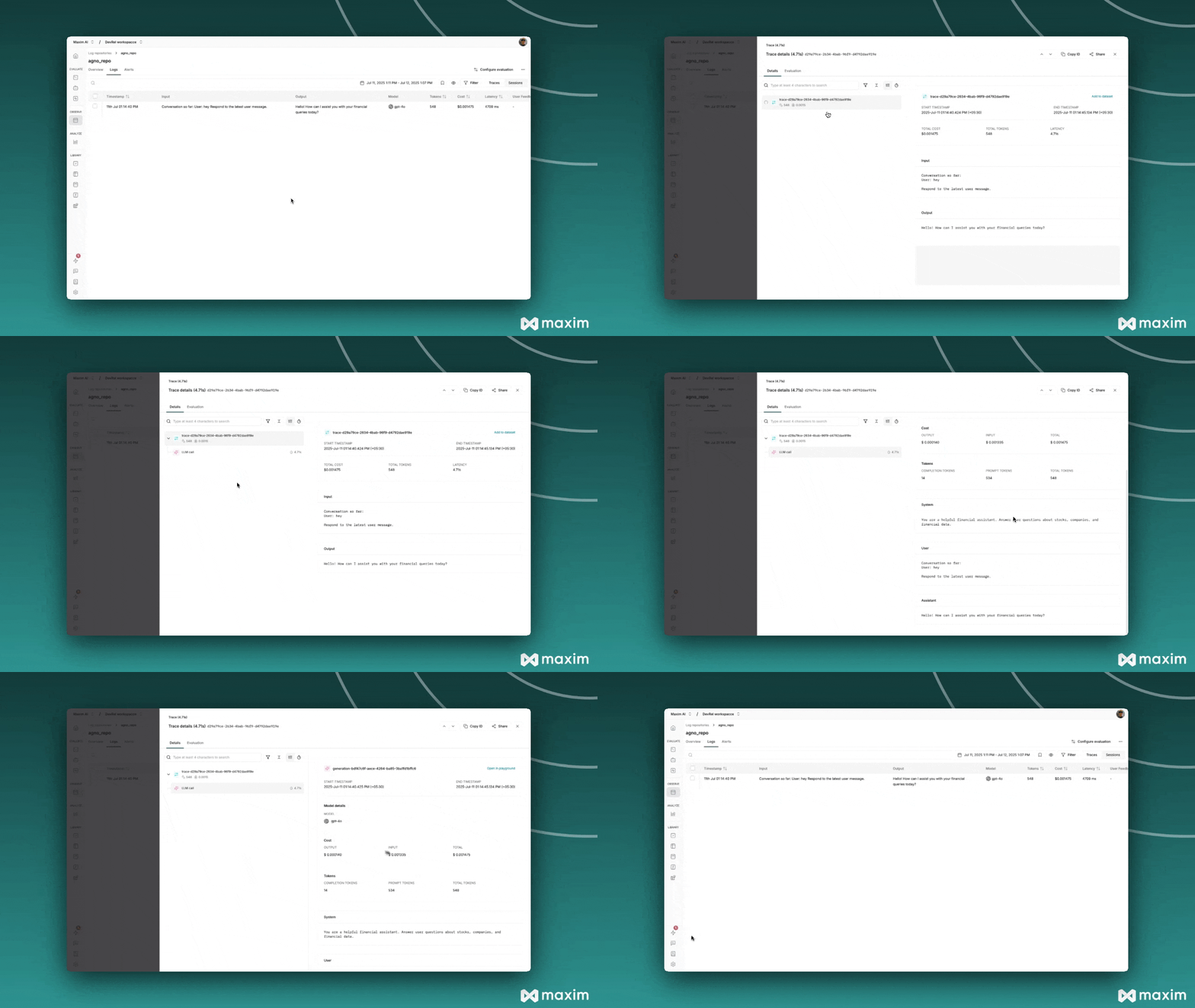
Features
Observability & Tracing
Maxim provides comprehensive observability for your Kern agents:
- Agent Tracing: Track your agent's complete lifecycle, including tool calls, agent trajectories, and decision flows
- Token Usage: Monitor prompt and completion token consumption
- Model Information: Track which models are being used and their performance
- Tool Calls: Detailed logging of all tool executions and their results
- Performance Metrics: Latency, cost, and error rate tracking
Evaluation & Analytics
- Auto Evaluations: Automatically evaluate captured logs based on filters and sampling
- Human Evaluations: Use human evaluation or rating to assess log quality
- Node Level Evaluations: Evaluate any component of your trace for detailed insights
- Dashboards: Visualize traces over time, usage metrics, latency & error rates
Alerting
Set thresholds on error rates, cost, token usage, user feedback, and latency to get real-time alerts via Slack or PagerDuty.
Notes
-
Environment Variables: Ensure your environment variables are correctly set for the API key and repository ID.
-
Instrumentation Order: Call
instrument_agno()before creating or executing any agents to ensure proper tracing. -
Debug Mode: Enable debug mode to see detailed logging information:
1instrument_agno(Maxim().logger(), {"debug" : True}) -
Maxim Docs: For more information on Maxim's features and capabilities, refer to the Maxim documentation.
By following these steps, you can effectively integrate Kern with Maxim, enabling comprehensive observability, evaluation, and monitoring of your AI agents.